Software for dentists and dental practices
StudioReminder supports dental practices in managing visits, checks and periodic recalls with automatic reminders and a professional digital agenda.
Less forgetfulness, more punctuality on visits
In a dental practice, continuity matters a lot: check-ups, oral hygiene, follow-ups and planned treatments require precise time management. When a customer forgets the appointment or does not return for a periodic reminder, the problem is not only organizational, but also one of continuity in the relationship with the practice.
With StudioReminder you can set automatic reminders via WhatsApp or email before the visit and schedule recurring communications for checks and reminders. In this way the client receives the message at the right time and the firm maintains more orderly management of the agenda without having to contact everyone manually.
The practical advantage is a single dashboard in which appointments, customers, confirmations and communication history remain aligned. This helps not only to reduce absences and delays, but also to make secretarial work more linear and the daily organization of the office more legible.
WhatsApp and email reminders for visits
The customer receives the reminder before the visit according to the set flow.
Checks and recalls
Schedule recurring communications to recontact customers over time.
More linear management
View confirmations and rescheduling clearly in one dashboard.
Reminder flow for dental practices
All the steps in the reminder area, from configuration to customer confirmation.
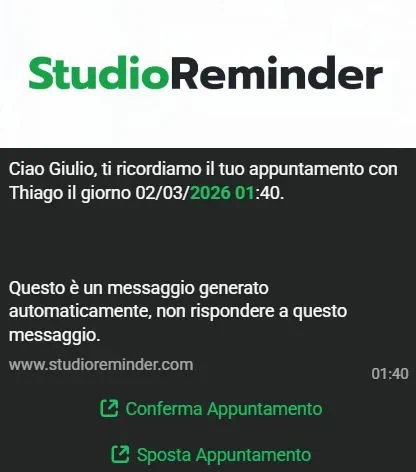
Personalize your reminder
You can customize it by creating your own web page from your account.
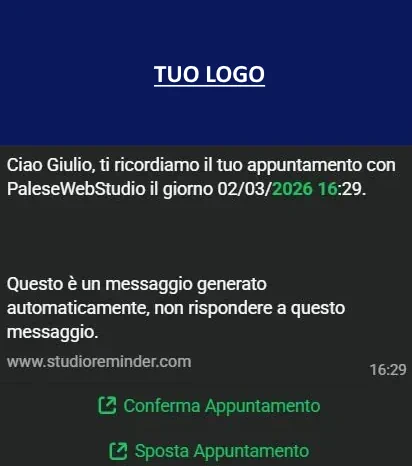
Sending automatic reminders
StudioReminder sends the reminder automatically.
Confirm or reschedule your appointment
The customer confirms or asks to move their appointment.
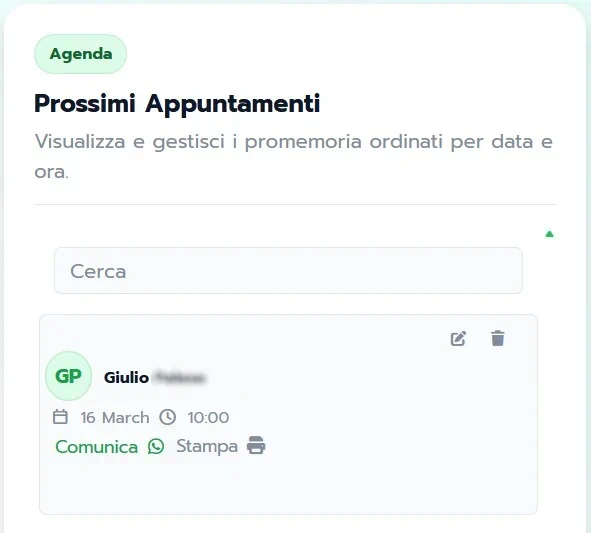
Check the status of the reminder
From your reminder area you can check if the customer has read the message and confirmed the appointment.
Because it can make the difference for a dental practice
Many dental practices handle appointments scheduled well in advance, short visits alternating with longer sessions, and clients who need to return weeks or months later. Without a clear system, recall often ends up relying on memory, loose papers or manual messages, with an operational load that grows along with the number of customers.
A reminder software for dentists is useful to alleviate this part. The practice can remember the appointment before the visit, reduce the risk of missed slots and plan an orderly communication when the time comes to call the customer back for hygiene or check-up. This improves internal efficiency and also makes administrative work more fluid.
StudioReminder lends itself well to this scenario because it combines digital agenda, customer management and communications in the same environment. It does not replace the clinical flow, but makes the organizational part that takes up study time every day easier.
Frequently asked questions about dentist software
Is StudioReminder suitable for dental practices with multiple professionals?
Yes. You can use it to manage appointments, reminders and recalls in an orderly manner even in offices with multiple operators or secretariats.
Can I send automatic reminders before visits?
Yes. After booking, the customer can receive automatic reminders via WhatsApp or email before the appointment.
Can periodic recalls for oral hygiene and check-ups be scheduled?
Certain. You can set recurring reminders for check-ups, oral hygiene and treatment follow-ups.
Does the software help manage confirmations and moves?
Yes. It helps you keep track of confirmations and agenda changes, reducing manual secretarial steps.
Google Calendar and Outlook connected in one flow
Learn more about integration, use cases and operational processes to reduce errors, duplicates and no-shows.
Complete synchronization guide
Complete overview of two-way synchronization between StudioReminder, Google Calendar and Outlook.
Open the complete guideGoogle Calendar integration
Connect your calendar and appointments to Google Calendar with continuous synchronization.
See Google integrationOutlook Calendar integration
Manage Outlook calendar and appointments from the same operational flow.
See Outlook integrationAvoid double bookings
Practical strategies to avoid overlaps between internal agenda and external calendars.
Read moreAlign your practice agenda and external calendars
Operational method for keeping appointments, changes and cancellations aligned.
Read moreCase study with real results
Concrete data on no-shows, management times and error reduction with active synchronization.
Read case studyOrganize customer visits, callbacks and reminders in one place
If you want to reduce no-shows and better manage recalls and periodic checks, you can try StudioReminder for free and see how it adapts to the real work of your practice.