Software for freelancers, consultants and freelancers
StudioReminder is also designed for consultants, coaches and professionals who work by appointment and want to automate reminders, recalls and communications with clients.
Simple and truly operational digital agenda
For consultants, coaches and professionals who work by appointment, the problem is not just scheduling the meeting but remembering it, confirming it and keeping the follow-up orderly. As consultations increase, a significant portion of time is lost on repetitive messages, manual reminders and searching for the right information at the right time.
StudioReminder simplifies this work in a dashboard accessible from desktop and mobile. It allows you to manage appointments, automatic reminders, confirmations and recurring communications in a single environment, without having to go through spreadsheets, paper agendas and scattered chats.
For those who work by appointment, the main benefit is very practical: fewer no-shows, more order in the day and more continuity in the relationship with active or prospective customers. The software remains light to use, but structured enough to accompany a real professional flow.
Appointment reminders
Reduce forgetfulness about consultations, calls and face-to-face meetings.
Confirmations and follow-ups
Manage periodic communications without leaving your workflow.
Desktop and mobile
The dashboard remains accessible wherever you work, without complex installations.
Memo flow for freelancers
All the steps in the reminder area, from configuration to customer confirmation.
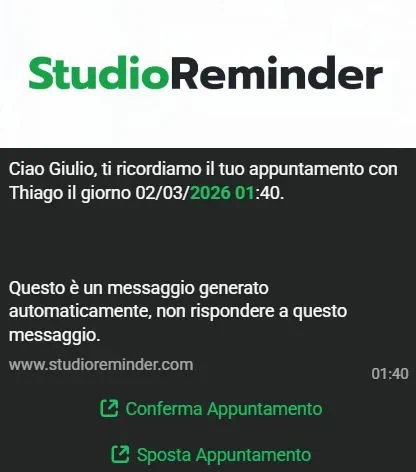
Personalize your reminder
You can customize it by creating your own web page from your account.
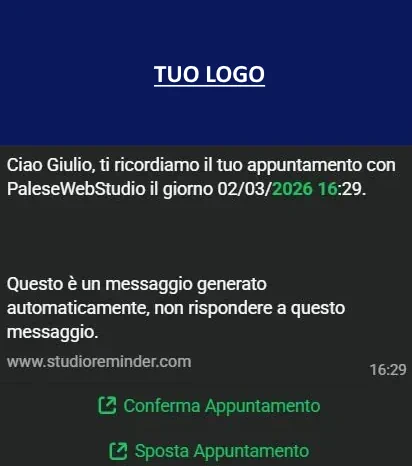
Sending automatic reminders
StudioReminder sends the reminder automatically.
Confirm or reschedule your appointment
The customer confirms or asks to move their appointment.
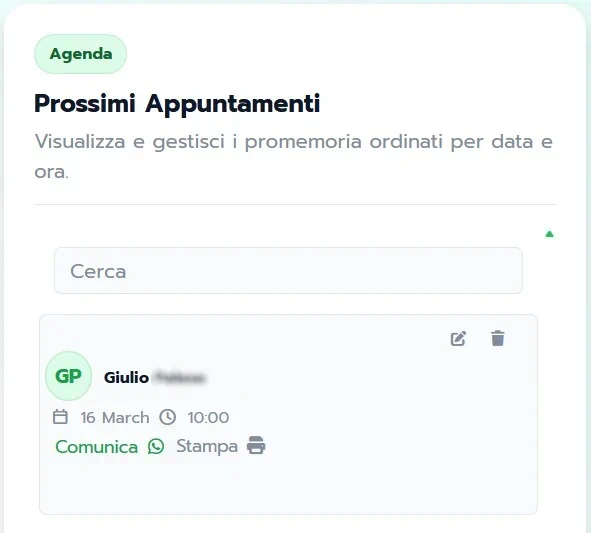
Check the status of the reminder
From your reminder area you can check if the customer has read the message and confirmed the appointment.
Suitable for those who need continuity, not complexity
This page is not designed for a single profession, but for a specific work model: individual consultations, scheduled appointments and the need to call the customer back over time. This is why StudioReminder can be useful to consultants, coaches, unstructured healthcare professionals, trainers or freelancers who work on recurring slots and meetings.
The automatic reminders feature is only part of the value. The other part is order: knowing where the appointments are, when to contact a customer again, when to send information and how to do it without reconstructing the context every time. Those who work alone or in a small studio feel this benefit a lot, because every additional administrative task directly weighs on the day.
With StudioReminder you have a tool that is simple to adopt but complete enough to support the growth of work by appointment. You don't have to change the way you work: you can just make it tidier, more readable and less dependent on memory and manual messages.
Frequently asked questions about software for freelancers
Is StudioReminder suitable for freelancers and consultants who work alone?
Yes. It is ideal for freelancers who want to manage appointments, reminders and follow-ups from a single tool.
Can I send automatic reminders for calls and in-person meetings?
Yes. After scheduling the appointment, the customer can receive automatic reminders via WhatsApp or email.
Is the software also useful for coaches and trainers?
Certain. It helps you maintain continuity on recurring sessions, paths and periodic contacts.
Can I use it for periodic follow-ups on active customers and prospects?
Yes. Recurring and multiple communications allow you to better manage commercial and relational follow-ups.
Google Calendar and Outlook connected in one flow
Learn more about integration, use cases and operational processes to reduce errors, duplicates and no-shows.
Complete synchronization guide
Complete overview of two-way synchronization between StudioReminder, Google Calendar and Outlook.
Open the complete guideGoogle Calendar integration
Connect your calendar and appointments to Google Calendar with continuous synchronization.
See Google integrationOutlook Calendar integration
Manage Outlook calendar and appointments from the same operational flow.
See Outlook integrationAvoid double bookings
Practical strategies to avoid overlaps between internal agenda and external calendars.
Read moreAlign your practice agenda and external calendars
Operational method for keeping appointments, changes and cancellations aligned.
Read moreCase study with real results
Concrete data on no-shows, management times and error reduction with active synchronization.
Read case studyUse StudioReminder for consultations, reminders and follow-ups
If you work by appointment and want fewer no-shows, more order and more continuity in communications with customers, you can try it for free and immediately see how it adapts to your work.